

For many SMEs, keeping accurate financial records can feel a bit like eating your vegetables, not always exciting, but absolutely essential for staying healthy. Reconciliation isn’t just a box-ticking exercise, it’s your business’s reality check, making sure your books match what actually happened in your accounts. Leave those little errors lurking, and they can quickly snowball into tax headaches, missed payments, or cash-flow surprises (and not the good kind).
Whether you’re doing your monthly housekeeping or that big year-end clean-up we all secretly hope goes smoothly, reconciliation keeps your numbers honest and your decisions informed.
In this guide, we break down why reconciliation matters, share practical checklists for both monthly and year-end tasks, and walk you through simple, step-by-step ways to manually spot and fix discrepancies before they grow legs.
Why Reconciliation Matters
Avoid financial discrepancies
Regular reconciliation helps you identify and correct accounting mistakes early such as double entries, missing invoices, or incorrect amounts before they become bigger issues at audit time.
Ensure tax readiness
Accurate reconciliations ensure your records are up to date and reflect real business activity, making your business better prepared for tax filings, audits, or regulatory checks.
Improve cash flow accuracy
By matching payments and receipts against your bank and ledger, you get a true picture of how much cash you actually have available, which supports smarter budgeting and planning.
Strengthen vendor/customer relationships
Reconciling ensures you’re not missing payments owed or overpaying vendors. This builds trust with suppliers and customers, reducing disputes and keeping your relationships strong.
Meet statutory and compliance obligations
During the year-end, businesses are required to prepare accurate financial statements. Timely reconciliations help ensure compliance with regulatory standards and provide auditors with clear, consistent records.
Monthly Reconciliation Checklist
- Bank Statement Reconciliation
- Accounts Receivable (AR)
- Accounts Payable (AP)
- Petty Cash
- Credit Card Statements
- E-wallet or DuitNow QR settlements
- Payment Gateway Transactions (FPX, Paydibs, Stripe, etc.)
- Payroll transactions
- GST/SST record accuracy
- Loan and finance repayments
Year-End Reconciliation Checklist (in addition to above)
- Inventory count vs system value
- Asset depreciation updates
- Loan interest accrued vs paid
- Unpaid invoices/final collections
- Unpaid bills or credits due
- Review of annual vendor/customer balances
- Final tax provision calculations
How to Reconcile (Step-by-Step)
1. Bank Reconciliation
- Download your bank statement (CSV or PDF)
- Export your accounting ledger for the same period
- Use Excel or reconciliation software to cross-check:
- Match transaction date, amount, and description
- Flag unmatched transactions
- Investigate differences: Late deposits, bank fees, missed entries
Example:
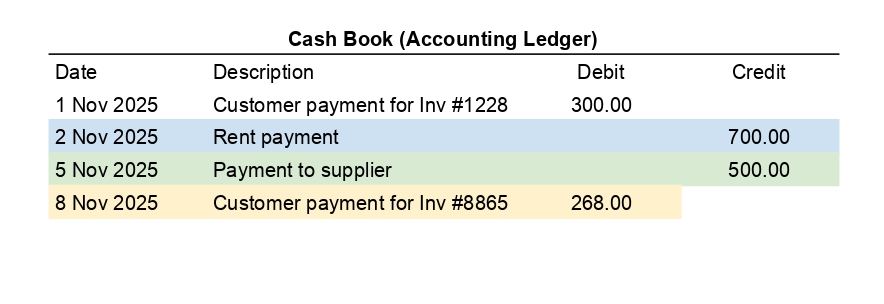
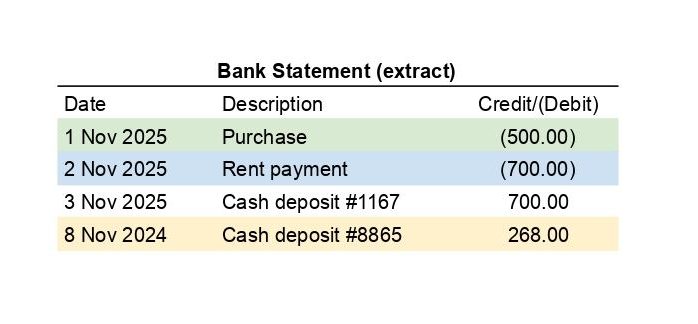
According to above scenario:
- Bank statement shows Cash deposit #1167 for RM700 that is not recorded in your Cash Book.
- Your Cash Book shows a Customer payment for invoice #1228 of RM300 that is not reflected in the bank statement.
Adjustments:
Cash Deposit #1167 (RM700) in Bank Statement:
- Since the RM700 cash deposit is in the bank statement but not in the cash book, you need to record it in your Cash Book.
- Action: Debit the Cash Book (Bank Account) with RM700 as a deposit entry.
Customer Payment for Invoice #1228 (RM300) in Cash Book:
- The RM300 customer payment appears in your Cash Book, but not in the bank statement. This could be an outstanding deposit or a transaction in transit (a deposit that has not yet cleared the bank).
- Action: Ensure that this transaction is noted under “outstanding deposits” during bank reconciliation.
2. Accounts Receivable (AR)
- Run AR Aging Report
- Match payments received to issued invoices
- Follow up on outstanding payments
- Apply customer payments accurately
3. Accounts Payable (AP)
- Run AP Aging Report
- Cross-check with supplier statements
- Match outgoing payments to invoice records
- Confirm early payment discounts or pending credits
4. E-Wallet & Payment Gateway
- Export monthly payout reports (like, Paydibs, Stripe, iPay88)
- Match deposits to invoices or POS sales
- Watch for failed or refunded transactions
- Confirm settlement dates and fees deducted
5. Payroll
- Match payroll bank transfers to payslips
- Reconcile EPF, SOCSO, EIS submissions with accounting entries
- Confirm salary advances or unpaid claims
6. GST/SST
- Confirm taxable income vs submitted figures
- Match tax charged on sales with actual collections
- Match input tax credits with supplier invoices
Further reading: What’s the Tax on the Bill? Understanding GST & SST in Malaysia
Manual Tips for Effective Reconciliation
- Use color-coding in Excel to track matched vs unmatched
Highlight matched transactions in green and unmatched in red or yellow. This visual aid makes it easy to scan and focus on discrepancies quickly. - Reconcile weekly for high-volume businesses
Don’t wait until month-end. For businesses with frequent transactions, reconciling weekly reduces backlog, helps detect issues earlier, and keeps your records up to date. - Create a reconciliation checklist per account
Have a structured checklist that includes bank accounts, payment gateways, vendor accounts, and credit facilities. Tick off each item to ensure nothing is missed. - Keep detailed notes on variances
If there’s a mismatch, document the reason (such as, pending clearance, date difference, duplicate entry). This helps track unresolved issues over time and avoids repeated investigation. - File all supporting documents (PDFs, receipts, emails)
Store documentation digitally in a well-organized folder structure, ideally by month and account. This supports audit trails and simplifies future reconciliations.
Tools to Consider
- Accounting software: Xero, QuickBooks, SQL
- Payment gateway: Paydibs, Stripe, iPay88
- Excel templates: Use pivot tables, filters, and VLOOKUP to speed up
- POS Integrations: Auto-sync transactions for easy matching
If you want a step-by-step guide to make sure nothing slips through the cracks, check out our comprehensive year-end accounting checklist, it’s the perfect companion to your reconciliation routine.
Final Thoughts
Reconciliation isn’t just a once-a-year scramble, it’s a monthly habit that keeps your business healthy, audit-ready, and stress-free. By reviewing each financial piece systematically, SMEs can ensure clean records and make confident, accurate decisions. Come year-end, reconciliation is even more crucial to finalize taxes and show stakeholders or banks the true financial picture.
Make it a habit, not a hassle.
If you ever need a hand communicating your business wins or financial milestones, the team at Press Digital PR Agency knows just how to make your story shine.