Key Takeaway
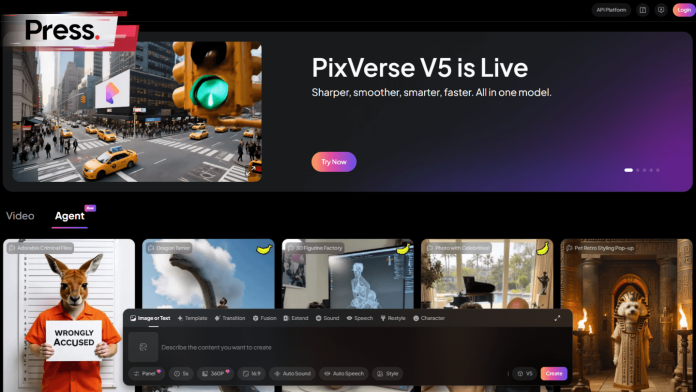
- PixVerse AI is a generative video platform now in Malaysia, designed for creating short, viral social media content from text or images.
- The platform is mobile-first and user-friendly, removing the high cost and technical skill barriers common in traditional video production.
- Its standout feature is a library of “Trending AI Effects,” like AI Dance, allowing creators to quickly participate in viral social media trends.
- A flexible freemium pricing model provides a free plan with daily credits, with paid options to remove watermarks and increase output.
- Compared to competitors, PixVerse excels at speed and social media readiness, while others focus on artistic images or professional editing.
Table of Contents
TogglePixVerse AI, a powerful generative video platform, is now available in Malaysia, offering a suite of tools designed to turn simple ideas into compelling video content with remarkable speed and ease.
For local businesses, marketers, and creators who have been held back by the high costs and steep learning curve of video production, this changes everything.
Imagine a local kuih seller creating a polished marketing video in minutes, not days.
This guide breaks down what PixVerse AI is, how to use it step-by-step, how it compares to other AI tools, and its pricing for the Malaysian market.
PixVerse vs. The Competition: A Quick Comparison
Feature | PixVerse AI | DALL-E 3 | Midjourney | RunwayML |
Primary Function | Short-form Video Generation | High-fidelity Image Generation | Artistic Image Generation | Professional Video Editing & Generation |
Target Audience (Malaysia) | Social Media Creators, SMEs, Marketers | Content Strategists, Bloggers, Marketers | Digital Artists, Designers, Ad Agencies | Filmmakers, Production Houses, Advanced Creators |
Ease of Use | Very High (Mobile-friendly, templates) | High (Conversational via ChatGPT) | Medium (Requires Discord, prompt crafting) | Medium-High (Web UI, but complex tools) |
Pricing Model | Freemium with Monthly Credits | Subscription (ChatGPT Plus) or Pay-per-Image (API) | Subscription based on GPU Time | Freemium with Tiered Credits (Complex) |
Key Strength | Speed & Viral Effects | Prompt Nuance & Text Accuracy | Artistic Style & Image Quality | Advanced Video Control & Features |
Still unsure which one suits your needs? This breakdown makes it easy.
What is PixVerse AI and Who is Behind It?
PixVerse AI is a generative video platform from AISphere, founded by Dr. Changhu Wang, a key expert behind TikTok’s visual AI technology.
The platform is the main product of AISphere, a company that recently secured nearly $41 million in funding from major investors. The founder’s deep experience at ByteDance, where he was instrumental in developing features for TikTok, has heavily influenced PixVerse.
This background gives the platform the “DNA” of a viral social media ecosystem. It prioritises lightning-fast generation, a mobile-first experience, and features designed specifically for creating short, engaging, trend-driven content—mirroring the core philosophy of TikTok.
Read more: AI untuk Rakyat: Malaysia’s FREE AI Course You’re Missing Out On
How Do You Create a Video with PixVerse AI?
You can create videos from text or images in a simple 5-step process, from account creation to downloading your upscaled video.
The platform is designed to be intuitive for absolute beginners. Here’s how you can create your first AI-generated video.
Step 1: Sign Up and Navigate the Dashboard
Getting started is fast. You can create a free account on the PixVerse website or mobile app using your Google, Apple, or Discord account. The dashboard is your creative hub, where you’ll find the main creation tools, an inspiration feed of trending videos, and your personal gallery.
Step 2: Choose Your Creation Mode
PixVerse offers two primary ways to generate content:
- Text-to-Video: Simply describe the video you want in the prompt box. For best results, be descriptive. Instead of “a car on a road,” a more effective local prompt would be:
“A Proton X70 driving through a lush, green palm oil plantation at sunrise, cinematic style, golden hour lighting.” - Image-to-Video: Animate any static photo you upload. For example, upload a photo of the Petronas Towers at night with the prompt:
“Make the lights on the towers twinkle and the clouds in the sky move slowly, hyper-realistic.”
Step 3: Customize Aspect Ratio, Style, and Camera Movement
After inputting your prompt, you can fine-tune the video settings. Choose a vertical
9:16 aspect ratio for TikTok or Instagram Reels, select a style like realistic or anime, and add camera movements like “pan” or “zoom” for a more professional look.
Step 4: Use Advanced Features
For more control, PixVerse offers advanced tools.
Key Frame Control lets you set a start and end frame for a seamless transition, while Fusion can blend up to three different images into one unique video.
Step 5: Upscale to HD or 4K and Download
Generation takes just a few seconds. If you like the result, you can upscale the video to HD (1080p) or even 4K quality, depending on your plan. Once complete, download the MP4 file and share it on your platforms.
What are PixVerse’s Best Features for Viral Content?
PixVerse excels with its one-click “Trending AI Effects” like AI Dance, Old Photo Revival, and Superhero transformations, designed to follow social media trends.
Perhaps the most unique aspect of PixVerse is its library of “Trending AI Effects.” These are complex, pre-packaged animations designed to replicate and amplify popular social media trends, not just simple filters.
The platform appears to follow a market-led strategy; it actively monitors platforms like TikTok to see what is popular and then builds features that allow users to easily join in on those trends.
This ensures the tool stays relevant to what local audiences are actively watching and sharing.
For Malaysian creators, these effects offer a direct way to create culturally resonant content:
- AI Dance Revolution: This viral effect animates a static image of a person or character into a dance sequence, perfect for memes and social challenges.
- Old Photo Revival: This effect brings old family photos to life, making it ideal for creating nostalgic content during Malaysian festive seasons like Hari Raya or Chinese New Year.
- Superhero Transformations: Tap into pop culture by transforming a person into a character like Venom for highly shareable clips.
- Earth Zoom Challenge: Recreate the popular TikTok zoom-out effect with a single click, saving hours of complex editing.
How Does PixVerse Compare to DALL-E 3, Midjourney, and RunwayML?
- PixVerse AI is best for: Creating a quick TikTok video for a local brand or animating a product photo for Instagram.
- DALL-E 3 is best for: Generating a specific hero image for a blog post or a detailed ad campaign creative.
- Midjourney is best for: Creating unique, artistic visuals for a high-end brand campaign or design project.
- RunwayML is best for: Producing a short film or a complex marketing video that requires custom effects and granular control.
The choice of tool depends entirely on your goal. A Malaysian marketing manager might use DALL-E 3 for a website banner, Midjourney for an artistic print ad, RunwayML for a product demo, and PixVerse to rapidly create a dozen videos for a TikTok campaign.
What Does PixVerse Cost in Malaysia?
PixVerse offers a freemium model, with a free plan that includes a watermark and paid plans starting around $10 USD/month to remove it and add credits.
The pricing is structured to be accessible to everyone, from students to professional agencies.
- Basic Plan (Free): Get started with an initial 90 credits plus 30-60 daily renewed credits. All videos will have a PixVerse watermark.
- Standard Plan (~$10/month): Includes 1,200 monthly credits and removes the watermark, allowing for HD exports.
- Pro Plan (~$30/month): Offers a substantial 6,000 credits per month and 1080p resolution support.
- Premium Plan (~$60/month): The top tier provides a massive 15,000 credits for power users and agencies.
The credit system is variable, with a single short video costing around 20 credits. This means the Standard Plan can produce roughly 60 watermark-free videos monthly.
Is PixVerse AI the Right Choice for Malaysian Creators?
For Malaysian creators, marketers, and small businesses looking for a fast, accessible, and trend-focused tool for social media, PixVerse AI is a powerful solution.
It successfully removes the traditional barriers of cost and technical skill that have long gated high-quality video production. By empowering anyone with an idea to produce cinematic-quality content in seconds, PixVerse is set to unlock a new wave of creativity and entrepreneurship across the country.
While tools like PixVerse provide a powerful shortcut to creating trend-worthy visuals, building a memorable brand requires a strategic approach. If you’re looking to turn viral moments into lasting brand value, our team at Press, a leading PR agency in Malaysia, can help you build the right strategy.
Legal Disclaimer: All brand names, trademarks, and logos displayed on this website are the intellectual property of their respective owners. Their use herein is solely for identification purposes without written consent or direct affiliation from the respective owner.
Frequently Asked Questions About PixVerse AI
What is PixVerse AI?
PixVerse AI is a generative AI platform that creates short videos from text prompts or static images, specifically designed for social media content.
How can I use PixVerse for free?
You can sign up for the Basic plan, which is free and provides a daily allowance of credits to generate videos. However, all videos created on this plan will include a watermark.
Why is PixVerse good for TikTok?
It is built for speed, has a mobile-first interface, supports the vertical 9:16 video format, and offers a library of one-click effects that directly follow TikTok trends.
Do I need to be an expert to use PixVerse?
No, the platform is designed with a user-friendly interface for beginners. It also includes templates and an AI Prompt Assistant to help you get started.
What makes PixVerse different from RunwayML?
PixVerse is optimized for speed, simplicity, and creating viral social media content with trendy effects. RunwayML is a more complex suite offering advanced, professional-grade video editing tools and controls.
Are there any limitations to the free version?
Yes, the primary limitations of the free Basic plan are a permanent watermark on all exported videos and a daily limit on the number of credits you can use for generation.